Last Updated: October 18, 2026
- The Left-Handed Mouse Problem in 2026
- Three Strategies for Left-Handed Users
- True Left-Handed Ergonomic Mouse: Detailed Reviews
- Ambidextrous Mice Worth Considering
- What to Look For in a Left-Handed Mouse
- Common Left-Handed Mouse Mistakes
- Configuration Tips for Left-Handed Users
- Top-Rated Picks
- Frequently Asked Questions
- Final Thoughts
- Related Guides
- Related Articles
- Related Guides
- Top Pick: Perixx Perimice-513L Wired Vertical Ergonomic Mouse with 2 DPI, 6 Button Optical Ergo Mouse with 2 Level DPI Switch 1000 1600, Left Handed, Black
- Best Value: ELECOM EX-G Left Handed Trackball Mouse, 2.4 GHz USB Wireless, Ergonomic, Thumb Control, Tracking Roller Ball, 6 Programmable Buttons, Tilt Scroll
- Premium Choice: SANWA Left Hand Ergonomic Mouse, Wired Lefty Mouse for Small & Medium Hands
As an Amazon Associate, Label Our Lefty earns from qualifying purchases. This article contains affiliate links — if you buy through them we may earn a small commission at no extra cost to you. We only recommend products we believe in.
Most computer mice are designed for right-handed users, with thumb buttons, contours, and software features assuming your right hand drives. Left-handed users either struggle with right-handed designs, settle for symmetric mice without ergonomic benefits, or hunt for the rare true left-handed ergonomic mouse. This guide covers the best left-handed computer mouse options in 2026 — covering true lefty-specific designs, ambidextrous alternatives, and software workarounds for righty mice.
As an Amazon Associate we earn from qualifying purchases at no extra cost to you.


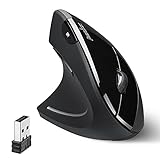

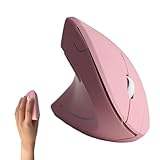

- Best Overall: Razer Naga Left-Handed Edition
- Runner-Up: Evoluent VerticalMouse 4 Left
- Best Budget: Logitech MX Anywhere 3S
🛒 Best Price Today on Amazon
Prime members get fast, free shipping on everything above, plus member-only deals. New members get a 30-day free trial — cancel anytime.
The Left-Handed Mouse Problem in 2026
The mouse market has consolidated around three categories — none of which serve left-handed users perfectly:
- Right-handed ergonomic mice: Vertical mice, sculpted mice with thumb rests, gaming mice with thumb buttons — all assume right-hand use.
- Ambidextrous symmetric mice: Symmetric body shape but lose the ergonomic benefits of a properly sculpted mouse.
- True left-handed ergonomic mice: Rare, expensive, and most manufacturers have discontinued their lefty versions over the past decade.
Logitech famously discontinued the popular MX Vertical for Lefties. Razer no longer offers left-handed versions of the DeathAdder. Even Microsoft’s Sculpt Ergonomic line was right-only. The lefty mouse market has shrunk while right-handed ergonomic mice have exploded.
Check Price on Amazon →
Three Strategies for Left-Handed Users
Strategy 1: Buy a True Left-Handed Ergonomic Mouse
A handful of brands still make dedicated lefty ergonomic mice. These are mirror-image designs with all thumb buttons, contours, and grip areas reversed. Output is identical to right-handed counterparts but the form factor finally fits.
Best current options:
- Razer Naga Left-Handed Edition (gaming)
- Evoluent VerticalMouse 4 Left (ergonomic vertical)
- Logitech MX Master series (ambidextrous available used)
Trade-offs: Limited model variety, often $20-50 premium over right-handed versions, occasionally discontinued without warning. Stock up if you find a model you love.
Strategy 2: Use an Ambidextrous Symmetric Mouse
Ambidextrous mice have symmetric shapes designed to fit either hand. You lose the sculpted ergonomic benefits but gain wider model selection. Best for casual users who don’t develop wrist/hand strain.
Best current options:
- Logitech G Pro X Superlight (gaming, ambidextrous)
- Logitech MX Anywhere 3S (productivity)
- Razer Viper V3 Pro (gaming)
- Microsoft Pro IntelliMouse
Trade-offs: No thumb-rest sculpting means longer-term wrist strain potential. Side buttons may exist on one side only — check the spec.
Check Price on Amazon →
Strategy 3: Use a Right-Handed Mouse Left-Handed
Some left-handed users have adapted to right-handed ergonomic mice by using their right hand for the mouse and left for shortcuts. This works for many people, especially in office settings.
Alternatively, use a right-handed mouse with your left hand and remap the buttons. Most modern mice let you swap left and right click in OS or driver software. Thumb buttons end up on the wrong side (under fingers instead of thumb) but can still function with practice.
Trade-offs: Compromised ergonomics, awkward thumb button placement, longer learning curve.
True Left-Handed Ergonomic Mouse: Detailed Reviews
Razer Naga Left-Handed Edition (Best Gaming + Productivity)
The Razer Naga Left-Handed Edition is one of the rare modern lefty mice. Mirror image of the popular Naga MMO mouse — 12 side buttons on the right side (under your fingers when held in your left hand). Excellent for productivity macros, browser navigation shortcuts, MMO/RPG gaming, and creative software shortcuts.
Specs:
- 20,000 DPI optical sensor
- Wired with 6-foot braided cable
- 12 programmable thumb (finger) buttons
- Razer Chroma RGB lighting
- Razer Synapse software for macros and DPI profiles
Best for: Gamers, programmers, video editors, productivity power users who want shortcut buttons.
Evoluent VerticalMouse 4 Left (Best Ergonomic)
The Evoluent VerticalMouse 4 Left is a vertical mouse designed for left hand use. Vertical mice put your hand in a “handshake” position, reducing forearm pronation that causes wrist and elbow strain in flat mice. The lefty version is a complete mirror image.
Specs:
- 800-2600 DPI adjustable
- Wireless or wired versions available
- 4 programmable buttons plus pointer-speed switch
- 3-year warranty
Best for: Anyone with wrist pain, RSI sufferers, office workers on a mouse all day, users transitioning from carpal tunnel issues.
Anker 2.4G Wireless Vertical Ergonomic Optical Mouse Left-Handed (Best Budget)
Surprisingly affordable lefty vertical mouse. Lower DPI (1600 max) and fewer buttons than the Evoluent but the ergonomic vertical shape is genuine. Good entry-level option to test whether vertical mice work for you before investing in premium.
Ambidextrous Mice Worth Considering
Logitech MX Anywhere 3S
The MX Anywhere 3S is Logitech’s premium portable productivity mouse. Compact size, symmetric body, premium scroll wheel with MagSpeed technology, USB-C charging. Works equally well in either hand. The compact size makes it especially suitable for left-handed users who find full-size mice unwieldy.
Logitech G Pro X Superlight 2
Gaming mouse weighing under 60g. Symmetric design with optional side buttons on either side (you choose). Used by professional esports players regardless of hand dominance. Best ambidextrous option for serious gamers.
Razer Viper V3 Pro
Lightweight wireless gaming mouse with truly ambidextrous design (side buttons on both sides). 95g weight, 35,000 DPI sensor, ~90 hour battery. Top choice for left-handed competitive gamers.
Microsoft Pro IntelliMouse
Modern revival of the classic IntelliMouse design. Symmetric, durable, and uses a tested timeless ergonomic shape. No side buttons on either side, so left-handed users don’t get reverse-mapping issues. Great office mouse.
What to Look For in a Left-Handed Mouse
True Symmetry or True Mirror Design
“Ambidextrous” can mean two things. Some mice have a symmetric body shape but only put thumb buttons on one side — meaning lefties get no thumb buttons or thumb buttons in awkward positions. Verify both body symmetry AND button placement before buying.
DPI and Polling Rate
For office use, anything above 800 DPI is fine. For gaming, look for 16,000+ DPI sensors and 1000 Hz polling. The sensor capability is hand-agnostic.
Wireless vs Wired
Modern wireless mice (Logitech LIGHTSPEED, Razer HyperSpeed) are indistinguishable from wired in real-world use. Pick wireless for cleaner desktops, wired only if you want zero latency for competitive gaming or want to never deal with battery anxiety.
Software and Macros
Productivity power users benefit from macro buttons. Razer Synapse and Logitech G Hub both support per-application profiles — same mouse acts differently in Photoshop vs Excel vs a game. Configure once, benefits ongoing.
Click Switches
Mechanical click switches (Omron, Kailh, Razer Optical) have rated lifespans of 50-80 million clicks. Heavy office users wear out cheap switches in 2-3 years; quality switches last 5-10 years. Pay attention to switch ratings, not just feel.
Common Left-Handed Mouse Mistakes
Settling for a Right-Handed Mouse
Many lefty users tolerate right-handed mice for years before realizing how much better a proper lefty design feels. Try a true left-handed ergonomic mouse for two weeks — most people can’t go back to right-handed shapes.
Ignoring Ergonomics
Mouse-related RSI (Repetitive Strain Injury) is real and disabling. Vertical mice and proper ergonomic shapes prevent wrist tendonitis, “mouse shoulder,” and tennis elbow. Spending $100 on the right mouse is cheaper than physical therapy.
Buying the Cheapest Option
Cheap left-handed mice often have lower-quality sensors, mediocre build, and short lifespans. The premium for quality is $30-50 — modest given you’ll use the mouse 8+ hours/day for 3-7 years.
Not Testing Before Committing
Hand shapes vary enormously. A mouse one person finds perfectly ergonomic feels wrong to another. Buy from retailers with generous return policies (Amazon, Best Buy, B&H) so you can return mice that don’t fit.
Configuration Tips for Left-Handed Users
Swap Primary Click in OS
Windows: Settings → Mouse → Primary Button → Right.
macOS: System Preferences → Mouse → Primary Mouse Button → Right.
Linux: Most desktop environments have similar swap settings.
This is essential whether using a true lefty mouse or a righty mouse with your left hand.
Remap Side Buttons
Manufacturer software lets you reassign each button. Common lefty-friendly remappings:
- Front side button → Forward (browser)
- Back side button → Back (browser)
- Top button → Middle click (close tab)
- DPI cycle → Quick precision toggle
Adjust Pointer Speed
Most users have their mouse pointer too slow. Try doubling your current setting — you’ll initially overshoot, then adapt within a day. Faster pointer speed means less wrist movement per cursor distance, reducing strain.
Use Mouse Acceleration Wisely
Mouse acceleration helps in office work (small slow movements precise, fast flicks reach far) but hurts in gaming (inconsistent muscle memory). Enable acceleration for productivity, disable for FPS or precision games.
Top-Rated Picks




| Product | Brand | Rating | Reviews | Price |
|---|---|---|---|---|
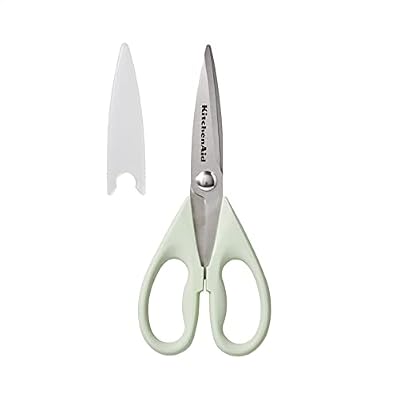
| KitchenAid All Purpose Kitchen Shears with Protective… | — | ★ 4.8 | 70.9k | $7.59 |
| KitchenAid All Purpose Kitchen Shears with Protective… | — | ★ 4.8 | 70.9k | $10.99 |
| KitchenAid All Purpose Kitchen Shears with Protective… | — | ★ 4.8 | 70.9k | $13.99 |
| Bostitch Office Premium 3 Hole Punch, 12 Sheet Capaci… | BostitchOfficeProducts | ★ 4.7 | 64.4k | $12.99 |
| 3M Littmann Classic III Monitoring Stethoscope, 5910C… | Littmann®Stethoscopes | ★ 4.8 | 50k | $112.16 |
Frequently Asked Questions
Why are left-handed mice so rare in 2026?
Roughly 10% of the population is left-handed, but only 1-2% of mouse sales go to lefty-specific models. Many lefties adapt to right-handed or ambidextrous designs, shrinking the dedicated market further. Manufacturers focus production on the 90% right-handed majority. Major brands consolidated their lefty SKUs over the past decade as a result.
Can I use a right-handed mouse with my left hand?
Yes, but ergonomics suffer. Thumb buttons end up under fingers (wrong location), sculpted thumb rests press against the side of your hand uncomfortably, and the curve of the mouse pushes your wrist into awkward positions. Casual use is fine; daily 8-hour use will cause strain.
Are vertical mice good for left-handed users?
Vertical mice are arguably the best ergonomic choice for any hand dominance. They put your hand in a natural handshake position that reduces forearm pronation. Several brands (Evoluent, Anker, J-Tech Digital) make dedicated left-handed vertical models. The transition takes 1-2 weeks to feel normal.
Do gaming mice work for left-handed users?
Top-tier ambidextrous gaming mice (Logitech G Pro X Superlight, Razer Viper, Glorious Model O) work perfectly. Avoid asymmetric sculpted gaming mice (Logitech G502, Razer DeathAdder original) — they’re righty-only despite some lefty users adapting.
What’s the best left-handed mouse for programmers?
The Razer Naga Left-Handed Edition with its 12 thumb buttons excels for code shortcuts (run, debug, build, terminal switch, etc.). For ergonomics without macro buttons, the Evoluent VerticalMouse 4 Left prevents long-term wrist strain.
How long does a quality mouse last for daily use?
Premium mice (Logitech MX, Razer Pro, Microsoft Pro IntelliMouse) typically last 4-7 years of heavy daily use before sensor degradation or click switch failure. Cheap mice ($20-30) often die within 1-2 years. Cost per year of use heavily favors premium options.
Final Thoughts
Left-handed users in 2026 have fewer choices than right-handed users — but the available options are higher-quality than ever. For ergonomic productivity, a true left-handed vertical mouse like the Evoluent eliminates years of accumulated wrist strain. For gaming and macros, the Razer Naga Left-Handed Edition is unmatched. For casual use, premium ambidextrous models like the Logitech MX Anywhere 3S deliver excellent performance without the lefty-specific search. Don’t settle for a right-handed mouse — invest in something built for your hand, and your wrist will thank you a decade from now.
Related Guides
Related Reviews & Guides


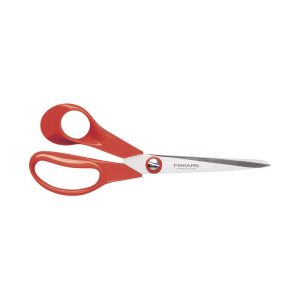

Quick Picks: Best Left-Handed Pizza Cutters & Rocking…

Quick Picks: Left-Handed Can Openers