Last Updated: October 11, 2026
- Quick picks by editing situation
- 1. Intel Core Ultra 9 285K + Z890: best all-round 4K combo
- 2. AMD Ryzen 9 9950X + X870E: best CPU-rendering and upgrade-value choice
- 3. Threadripper 7960X + TRX50: best for lanes, memory capacity, and heavy production
- Rendering expectations: what the numbers really mean
- PCIe lanes and RAM: the specifications that affect ownership
- Setup choices that prevent slowdowns
- Which combo should you buy?
- Top Pick: INLAND Micro Center CPU Motherboard Combo – Intel Core i7-14700K 20 Cores up to 5.6 GHz Unlocked LGA 1700 Desktop Processor with MSI PRO Z790-P WiFi ProSeries Motherboard
- Best Value: Micro Center CPU Motherboard Combo – Intel i9-14900K 14th Gen 24-Cores LGA 1700 Desktop Processor Bundle with TUF Gaming Z790-Plus WiFi Gaming Motherboard
- Premium Choice: Micro Center Intel core Ultra 5 250kf Plus Bundle ASUS Z890 AYW Gaming WiFi
The best CPU motherboard combo for video editing in 2026 is the Intel Core Ultra 9 285K with a Z890 motherboard for mixed 4K work, while the AMD Ryzen 9 9950X with an X870E board is the stronger choice for CPU-heavy exports and a Threadripper 7960X with TRX50 is the specialist option for serious multicamera, 8K, and high-volume workloads.
As an Amazon Associate we earn from qualifying purchases at no extra cost to you.


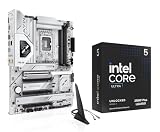

Quick picks by editing situation
| Situation | Recommended combo | Why it fits | Typical platform budget |
|---|---|---|---|
| Mixed Premiere Pro or DaVinci Resolve 4K editing | Intel Core Ultra 9 285K + Z890 | Strong hybrid performance, Quick Sync support, PCIe 5.0, DDR5 | $850–$1,150 |
| CPU rendering, encoding, and long exports | AMD Ryzen 9 9950X + X870E | 16 full-performance cores and flexible AM5 upgrade path | $900–$1,250 |
| 8K, multicamera, heavy effects, or frequent professional delivery | AMD Threadripper 7960X + TRX50 | 24 cores, quad-channel memory, and many PCIe lanes | $2,000–$2,800 |
| Good 4K performance on a tighter budget | AMD Ryzen 9 9900X + B850 or X870 | 12 cores, efficient operation, and a lower-cost AM5 platform | $650–$950 |
These ranges cover the processor and motherboard, not the graphics card, memory, storage, cooler, or power supply. Actual export time varies considerably with codec, effects, GPU acceleration, source media, and software version, so the figures below should be treated as planning estimates rather than guarantees.
1. Intel Core Ultra 9 285K + Z890: best all-round 4K combo
The Core Ultra 9 285K is the most broadly useful pick when a system must handle timeline work, background applications, proxy generation, and delivery exports. Its hybrid design combines 8 performance cores with 16 efficiency cores, and Intel Quick Sync can accelerate supported H.264, HEVC, and AV1 workflows when the motherboard exposes the processor’s integrated graphics.
That media-engine advantage matters more than a small difference in all-core CPU benchmarks. Premiere Pro users working with long-GOP camera footage may see smoother scrubbing and faster format conversion than they would from a similarly priced CPU without a useful integrated media engine. DaVinci Resolve can also benefit from hardware decoding, although demanding effects remain heavily dependent on the discrete GPU.
What to look for on a Z890 board
- At least three M.2 sockets, with one PCIe 5.0 slot if a future high-speed project drive is important.
- Two or more USB-C ports, preferably including a rear USB4 port for fast external storage.
- Four DDR5 DIMM slots supporting at least 192GB, with 64GB or 96GB modules supported by the specific board BIOS.
- A heatsinked primary M.2 socket and adequate VRM cooling for sustained exports.
For a typical 4K editing workstation, install 64GB of DDR5 as a starting point and move to 96GB or 128GB if using After Effects, large Fusion compositions, or multiple applications at once. A sensible build might use a 2TB system SSD, a separate 4TB media SSD, and an external or network backup rather than placing every workload on one drive.
2. AMD Ryzen 9 9950X + X870E: best CPU-rendering and upgrade-value choice
The Ryzen 9 9950X offers 16 cores and 32 threads on AMD’s AM5 socket. It is particularly attractive for CPU-based encoding, rendering, transcoding, and batch jobs where sustained multithreaded throughput matters more than integrated media acceleration.
An X870E motherboard gives this processor generous connectivity, including PCIe 5.0 support for a graphics card and at least one NVMe drive, depending on the board design. It also provides a practical route to future AM5 processors, although exact compatibility depends on BIOS support and AMD’s future product plans. That makes the platform easier to justify for an editor who may upgrade the CPU without replacing the motherboard.
Choose X870E rather than overspending blindly
Premium X870E boards are useful when you need several fast NVMe drives, USB4, a high-end GPU, or substantial external connectivity. They are not automatically faster for editing than a well-designed B850 or standard X870 board. The CPU determines most rendering performance; the motherboard mainly determines expansion, storage layout, memory stability, and sustained power delivery.
For a single-GPU 4K workstation, a quality X870 board may be enough. Select X870E when the build needs multiple PCIe 5.0 devices, several high-speed storage devices, or a more spacious lane layout. The 9950X has no integrated graphics, so pair it with a discrete GPU even if the initial plan is basic editing.
3. Threadripper 7960X + TRX50: best for lanes, memory capacity, and heavy production
The Threadripper 7960X is overkill for occasional 4K editing, but its 24 cores, 48 threads, quad-channel DDR5 RDIMM memory, and extensive PCIe connectivity make it the most capable platform here for demanding production pipelines.
TRX50 boards can provide enough lanes for a high-end GPU, multiple NVMe drives, capture hardware, a 10GbE network adapter, and additional expansion cards without forcing every device to share a narrow connection. This is valuable in an editing room with local RAID, fast shared storage, professional I/O, and several simultaneous workloads.
| Combo | CPU cores/threads | Memory approach | Platform PCIe potential | Best workload |
|---|---|---|---|---|
| Core Ultra 9 285K + Z890 | 24 cores / 24 threads | Dual-channel DDR5 | PCIe 5.0 consumer expansion | Mixed 4K editing and hardware-assisted media |
| Ryzen 9 9950X + X870E | 16 cores / 32 threads | Dual-channel DDR5 | PCIe 5.0 GPU and NVMe support | CPU exports and flexible enthusiast workstations |
| Threadripper 7960X + TRX50 | 24 cores / 48 threads | Quad-channel DDR5 RDIMM | Many high-bandwidth PCIe lanes | 8K, multicamera, batch rendering, and expansion cards |
The trade-offs are substantial: the processor and motherboard cost much more, RDIMM memory is less familiar to mainstream builders, and the platform requires serious cooling. If the workstation does not regularly keep many cores busy or use multiple expansion devices, that money is usually better spent on a faster GPU, more RAM, or redundant storage.
Rendering expectations: what the numbers really mean
As a planning example, consider a 20-minute 4K project with moderate color correction, several titles, and a few GPU-accelerated effects. On a properly configured system, a Core Ultra 9 285K or Ryzen 9 9950X paired with a capable discrete GPU might complete a hardware-assisted H.264 or HEVC export in roughly 4–8 minutes. A CPU-heavy software encode could take approximately 10–20 minutes, depending on the codec and quality settings.
A Threadripper 7960X may reduce the CPU-heavy portion substantially, but it will not necessarily halve a GPU-limited export. If the timeline is waiting on noise reduction, optical flow, heavy grading, or an insufficient GPU, changing the CPU alone produces little improvement. This is why the best combo should be matched to the software’s bottleneck rather than selected by core count.
PCIe lanes and RAM: the specifications that affect ownership
For ordinary 4K work, PCIe lane count is rarely the first limitation. A single modern graphics card and two or three NVMe drives fit comfortably on mainstream platforms. Lane planning becomes important when adding a capture card, RAID controller, 10GbE adapter, multiple GPUs, or several PCIe 5.0 drives.
RAM capacity is easier to feel in daily use. Use 32GB only for lighter 4K projects and uncomplicated timelines. Use 64GB for a mainstream editing workstation, 96GB or 128GB for demanding 4K and motion graphics, and 128GB or more for 8K, large RAW projects, or simultaneous editing and compositing. Check the motherboard’s qualified memory list before buying unusually large modules.
Setup choices that prevent slowdowns
- Update the motherboard BIOS before tuning memory. New BIOS releases often improve DDR5 compatibility and processor behavior.
- Separate media from the operating system. Keep applications on one SSD and active footage, cache, or previews on another when the board has enough sockets.
- Set the cache location deliberately. A full cache drive can cause dropped frames and failed exports even when the CPU is powerful.
- Use a sustained-load cooler. Choose a large tower cooler or 280mm/360mm liquid cooler where the case and socket support it; short benchmark performance is less important than maintaining clocks during a long export.
- Test the complete workflow. Export a representative project in the intended codec, then monitor CPU, GPU, RAM, storage, and temperatures. Upgrade the component that reaches its limit first.
Which combo should you buy?
Choose the Core Ultra 9 285K and Z890 if you edit mixed camera formats in Premiere Pro and value Quick Sync, broad connectivity, and responsive everyday operation. Choose the Ryzen 9 9950X and X870E if CPU rendering, exports, and long-term AM5 flexibility matter most. Choose the Threadripper 7960X and TRX50 only when the workload justifies its lanes, memory bandwidth, and core count.
For most left-handed creators building a single high-end 4K workstation in 2026, the Intel combination is the safest all-rounder, while the Ryzen combination is the better platform when the discrete GPU handles media acceleration and CPU throughput is the priority. Whichever route you take, budget for sufficient RAM, separate project storage, cooling, and backups; those ownership details often affect editing speed more than a small difference between premium CPUs.
Related Reviews & Guides





6 Best Global Golf Left Handed Golf Clubs 2026

6 Best Left Handed Binders 2026