Last Updated: October 22, 2026
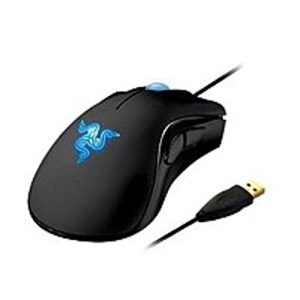
- Top Pick: Razer DeathAdder Essential – Left-Handed Esports Ergonomic Gaming Mouse – 3,500 Adjustible DPI
- Best Value: Razer RZ01-01050100-R3M1 Naga Left-Handed – Ergonomic MMO Gaming Mouse with 12 Programmable Thumb Buttons – 8,200 Adjustible DPI
- Premium Choice: ELECOM EX-G Left Handed Trackball Mouse, 2.4 GHz USB Wireless, Ergonomic, Thumb Control, Tracking Roller Ball, 6 Programmable Buttons, Tilt Scroll
Left-handed gamers have spent years settling for symmetrical mice designed for nobody in particular, but the market has finally caught up. In 2026, there are real ergonomic options built specifically for the left hand, from esports-grade optical mice to vertical designs that ease wrist strain during long sessions.
This roundup compares six left-handed mice across gaming performance, comfort, and value, so you can pick the one that actually fits your grip and your budget.
As an Amazon Associate we earn from qualifying purchases at no extra cost to you.





⚡ Save on Your Next PC — Amazon Prime
Prime members get fast free shipping on the systems above, plus early access to Prime Day & Black Friday PC deals. New members get a 30-day free trial.
Watch: Comparing Left-Handed Gaming Mice: Speed and Responsiveness — Video Review
How to Choose
- Grip style: Palm grip favors a fuller ergonomic shell like the Naga or DeathAdder, while claw or fingertip grip works better with lighter, lower-profile shapes like the Redragon M612.
- Sensor DPI: Competitive shooters benefit from sensors above 8,000 DPI with low click latency, while everyday use and productivity rarely need more than 2,000 DPI.
- Button count: MMO and MOBA players should look for 6 or more programmable buttons, ideally clustered on the thumb ridge for quick access without lifting your hand.
- Connection type: Wired mice still edge out wireless for input lag in competitive play, but 2.4 GHz wireless options like the ELECOM trackball are close enough for most everyday gaming.
- Wrist strain relief: If you deal with wrist fatigue, a vertical design or trackball removes the need to move your whole arm across the desk, which matters more over a 6-hour session than raw DPI.
The Best Picks Reviewed
Razer DeathAdder Essential Left-Handed
The DeathAdder Essential brings Razer’s esports-proven shape to left-handed players with a 3,500 DPI optical sensor and the same ergonomic curve that’s made the right-handed version a staple for over a decade. It’s a wired mouse, which keeps click latency minimal, and the shape suits palm and claw grips equally well. This is the pick for players who want a no-frills, competitively reliable mouse without paying for features they won’t use.
Razer Naga Left-Handed
With 12 programmable thumb buttons and an 8,200 DPI sensor, the Naga is built for MMO and MOBA players who need to bind entire ability bars to their mouse. The button grid takes a few days to learn by feel, but once it clicks, it cuts down on keyboard reaches significantly. At this price point, it’s the most feature-dense option in this roundup, and worth it if you actually use macro-heavy keybinds.
ELECOM EX-G Left-Handed Trackball
The EX-G swaps a traditional sensor for a thumb-operated trackball, which means your hand stays stationary while you aim, a real advantage for anyone managing wrist or elbow pain. It connects over 2.4 GHz wireless, has 6 programmable buttons, and adds a tilt-scroll wheel for lateral scrolling in spreadsheets or timelines. It’s less suited to fast-twitch shooters but excellent for strategy games, MMOs, and general desktop use where comfort matters more than raw speed.
ELECOM Left-Hand Wired Ergonomic Mouse (M-XGL31UBSKBK)
This is the budget-friendly, low-fatigue option in the lineup. It runs a 2,000 DPI optical sensor, 5 buttons, and silent clicks, and its large ergonomic shell supports the whole hand rather than just the fingers. It’s not built for competitive gaming, but for casual play, browsing, and office work mixed with light gaming, it’s a comfortable daily driver that won’t strain your wrist over long hours.
Redragon M612 Wired RGB Optical Gaming Mouse
The M612 packs an 8,000 DPI sensor and remappable buttons into a lightweight, ambidextrous shell with RGB lighting. It’s not left-hand-specific in shape, but its symmetrical design means left-handed players get full functionality without compromise, and its low price makes it an easy way to test high-DPI gaming without committing to a premium mouse.
Frequently Asked Questions
Do left-handed gaming mice actually perform differently than right-handed ones?
The sensors and switches are typically identical to their right-handed counterparts. The difference is purely ergonomic, the shell is mirrored so thumb buttons and palm support sit correctly under a left hand instead of forcing an awkward grip.
Is a trackball mouse good for fast-paced gaming?
Trackballs like the ELECOM EX-G are better suited to strategy games, MMOs, and general use than twitch-reflex shooters, since flicking a thumb ball is less precise for quick 180-degree turns than a full sensor-based swipe.
How much DPI do I actually need for gaming?
Most competitive players play between 400 and 1,600 DPI with high in-game sensitivity, even on mice rated for 8,000 or more. The higher DPI ceiling matters mainly for very high-resolution monitors or players who prefer low sensitivity with large physical swipes.
Are ambidextrous mice like the Redragon M612 a good substitute for a true left-handed design?
They’re a solid budget substitute since both hands get equal access to buttons, but they lack the contoured palm support and off-set thumb rest that true left-handed ergonomic mice provide, which matters most during long sessions.
Final Thoughts
For most left-handed gamers, the Razer DeathAdder Essential is the safest all-around pick, combining a proven ergonomic shape with reliable esports performance. If you play MMOs or need extensive keybinds, the Razer Naga’s 12-button layout is worth the upgrade. And if wrist comfort is your top priority over raw gaming performance, the ELECOM EX-G trackball is the standout choice in this lineup.
Related Reviews & Guides


Left-Handed Kitchen Knives: Precision Cutting for Southpaws

Left-Handed Scissors: Safety Features for Children