Last Updated: October 8, 2026
A good thermal label printer eliminates ink, speeds up your workflow, and produces sharp, scannable labels for shipping, inventory, and organization. Because thermal printing uses heat instead of cartridges, the ongoing cost is low and maintenance is minimal, which is why these machines dominate home offices and small businesses in 2026. This guide covers the best thermal label printers and how to choose the right one for your needs.
As an Amazon Associate I earn from qualifying purchases.




How We Compared Each Thermal Label Printer
We looked at print resolution, speed, label-size flexibility, connectivity, and how easily each thermal label printer integrates with popular software. The best machines calibrate quickly, resist jams, and produce dark, high-contrast barcodes that scan on the first try. Here is a side-by-side of our top recommendations.
| Product | Best For | Standout Feature | Rating |
|---|---|---|---|
| Rollo X1040 | Versatile all-around use | Universal software support | 4.8/5 |
| MUNBYN RealWriter 941 | First-time buyers | Automatic label calibration | 4.6/5 |
| Brother QL-820NWB | Office labeling | Two-color thermal printing | 4.7/5 |
| Zebra ZD230 | Business durability | Commercial reliability | 4.7/5 |
| Phomemo M110 | Portable projects | Bluetooth handheld printing | 4.4/5 |
How Thermal Label Printer Technology Works
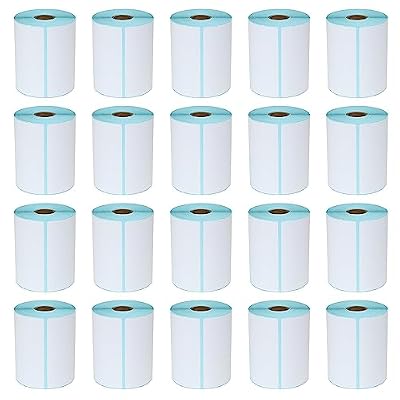
A direct thermal label printer applies heat to specially coated paper, darkening it to form text and barcodes without any ink, toner, or ribbon. This makes the printer cheaper to run and virtually maintenance-free aside from the occasional print-head cleaning. The trade-off is that thermal labels can fade over time when exposed to heat or sunlight, so they suit shipping and short-to-medium-term uses best. If you want permanence, our guide to laminated tape versus thermal labels explains when each wins.
The two big variables are label handling and connectivity. Some printers accept only rolls, others take fanfold stacks, and premium units auto-detect gaps between die-cut labels. On connectivity, USB is reliable and simple, while Wi-Fi and Bluetooth let you print from phones and tablets. Matching these features to your volume prevents overspending. Our overview of choosing between roll and fanfold labels helps you decide before you buy.
Rollo X1040 — Best Overall Thermal Label Printer
The Rollo is beloved by online sellers because it works with nearly any platform and prints crisp 4×6 labels at impressive speed. It handles rolls and fanfold labels with rarely a jam. Pros: universal compatibility, fast, dependable. Cons: the latest wireless versions cost more, and you will want a stand or holder to feed fanfold stacks neatly at your workstation.
MUNBYN RealWriter 941 — Best Budget Thermal Label Printer
MUNBYN offers excellent value, automatically calibrating to your label size and delivering clean output for a modest price. It is a great first thermal printer for new sellers. Pros: affordable, easy calibration, sharp barcodes. Cons: the housing feels lighter than premium models, and initial driver setup can require a couple of extra steps depending on your operating system.
Brother QL-820NWB — Best Office Thermal Label Printer
The QL-820NWB stands out with two-color thermal printing on special tape, letting you add red emphasis without ink. It offers Wi-Fi, Bluetooth, and Ethernet for flexible office use. Pros: versatile connectivity, unique two-color feature, sharp text. Cons: it uses Brother’s DK label system rather than generic rolls, so supply choices are narrower and slightly pricier than open-format printers.
Zebra ZD230 — Best for Business Use
Zebra’s commercial pedigree shows in the ZD230, a rugged thermal label printer built to run all day in demanding environments. It is a warehouse and retail staple. Pros: durable, fast, proven reliability. Cons: the setup and software lean toward business users, making it more complex than consumer models, and its capabilities exceed what a casual home seller actually needs.
Phomemo M110 — Best Portable Thermal Label Printer
The pocket-sized M110 prints small thermal labels over Bluetooth from your phone, perfect for organizing, price tags, and craft projects on the go. Pros: highly portable, no cables, fun app templates. Cons: it prints narrow labels only and is not suited for standard 4×6 shipping, so treat it as a companion device rather than a primary shipping printer.
iDPRT SP410 — Best Value Workhorse
The iDPRT SP410 quietly balances price and performance, handling both roll and fanfold labels with quick calibration. It is a dependable pick for a growing shop. Pros: reasonable cost, sturdy build, flexible loading. Cons: the base model lacks wireless, so it stays tethered to a computer, and the bundled software is more functional than polished.
Getting the Best Results from Your Thermal Label Printer
Always buy quality direct thermal labels and store them out of sunlight and heat to prevent premature darkening. Clean the print head periodically with an alcohol wipe to keep barcodes crisp, and recalibrate whenever you switch label sizes. To connect everything smoothly, our guide to integrating a thermal printer with shipping software walks through the setup, while our 4×6 thermal label buying guide helps you stock up affordably. If your labels are fading faster than expected, our troubleshooting thermal print quality article covers the common fixes.
Frequently Asked Questions
Does a thermal label printer need ink or toner?
No, a direct thermal label printer uses heat to darken specially coated paper, so it requires no ink, toner, or ribbon. Your only ongoing cost is the thermal label rolls themselves, which are inexpensive in bulk. This makes thermal printers significantly cheaper to operate than inkjet or laser printers for label-heavy tasks.
Why do my thermal labels fade over time?
Thermal labels fade because the heat-sensitive coating gradually reacts to light, warmth, and friction, darkening or lightening the whole label. This is normal for direct thermal printing and rarely an issue for shipping labels that get scanned within days. For long-term labels, choose laminated tape or thermal-transfer printing, which resist fading far better.
Can I use any label rolls in a thermal label printer?
You must use direct thermal labels, since the printer creates images through heat rather than ink. Beyond that, compatibility depends on width, core size, and whether your printer accepts rolls or fanfold stacks. Open-format printers like the Rollo take generic labels, while some brands use proprietary cartridges, so confirm the format before buying.
Is a thermal label printer good for more than shipping?
Absolutely. Thermal label printers excel at inventory tags, barcodes, product labels, file organization, and even name badges. Compact Bluetooth models are popular for home organization and craft projects. As long as the label does not need to survive years of sun exposure, thermal printing offers a fast, ink-free solution for a wide range of everyday labeling tasks.
Related Reviews & Guides


6 Best Global Golf Left Handed Golf Clubs 2026
6 Best Keyboards For Left Handed 2026