Last Updated: October 11, 2026
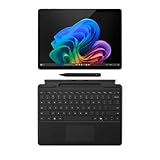
- Top Pick: Microsoft Surface Pro 11 Copilot PC Bundle, 13" 2.8K Touchscreen Tablet with Black Pro Keyboard & Slim Pen, Snapdragon X Plus, 16GB RAM, 256GB SSD, Win 11 Pro, Black
- Best Value: Microsoft Surface Pro (2026), 13-inch Premium Performance 2-in-1 Laptop, Snapdragon X2 Plus Processor, Touchscreen Display, 16GB RAM, 512GB SSD Storage, Windows 11 Copilot+ PC Built for AI, Black
- Premium Choice: Microsoft Surface Pro 11 Copilot PC Bundle, 13" 2.8K Touchscreen Tablet with Black Pro Keyboard & Business Pen, Snapdragon X Plus, 16GB RAM, 512GB SSD, Win 11 Pro, Black
The best Copilot+ PCs for everyday AI
The best Copilot+ PC for most people is a 13- or 14-inch Windows laptop with a 40-TOPS-class NPU, 16GB or more of memory, and a battery rated for a full workday; choose a Microsoft Surface Laptop for a polished everyday experience, an ASUS Zenbook A14 for lighter weight, or a Lenovo ThinkPad T14s for business-friendly ports and serviceability.
Those picks reflect an important distinction: Copilot+ is a Windows hardware category, not a guarantee that every AI feature will run locally or that every laptop will last equally long away from an outlet. Look at NPU capability, memory, screen, port selection, and ownership costs together. Prices below are approximate market ranges and vary by configuration and region.
As an Amazon Associate we earn from qualifying purchases at no extra cost to you.


Quick comparison
| Model | Size and weight | Processor and NPU | Battery capacity | Screen | Typical price range |
|---|---|---|---|---|---|
| Microsoft Surface Laptop 7 | 13.8-inch: about 1.34 kg; 15-inch: about 1.66 kg | Snapdragon X Plus or X Elite; up to 45 TOPS | About 54 Wh (13.8-inch); 66 Wh (15-inch) | PixelSense touchscreen, 2304 × 1536 or 2496 × 1664 | About $900–$1,800 |
| ASUS Zenbook A14 (UX3407) | 14-inch; about 0.98 kg | Snapdragon X Plus or X Elite configurations; up to 45 TOPS | 70 Wh | 14-inch OLED, 1920 × 1200 | About $1,000–$1,500 |
| Lenovo ThinkPad T14s Gen 6 (Snapdragon) | 14-inch; about 1.24 kg | Snapdragon X Plus or X Elite; up to 45 TOPS | 58 Wh | 14-inch IPS or OLED, depending on configuration | About $1,300–$2,000 |
| HP OmniBook X 14 | 14-inch; about 1.34 kg | Snapdragon X Plus or X Elite; up to 45 TOPS | 59 Wh | 14-inch IPS touchscreen, 2240 × 1400 | About $900–$1,500 |
Weights, panels, batteries, and processors can vary by exact configuration. Confirm the specification for the model number you are considering; manufacturers sometimes sell similar-looking versions with different screens or memory.
Choose by the way you’ll use it
Best all-rounder: Microsoft Surface Laptop 7
The Surface Laptop 7 is a strong everyday choice if you want a crisp touchscreen, a comfortable keyboard and trackpad, and a premium build without moving to a large workstation. Its 13.8-inch version balances portability and workspace, while the 15-inch version is easier for split-screen work. Snapdragon X configurations meet the Copilot+ NPU threshold, and the 66 Wh battery in the larger model gives it more capacity for long days.
The trade-off is connectivity: the Surface Laptop has USB-C, USB-A, and a Surface Connect port, but not the broad selection of ports found on some business laptops. If you often plug in wired network, HDMI, or several USB devices, budget for a hub. Memory is soldered, so buy enough at checkout—16GB is a sensible floor for everyday multitasking, with 32GB better for heavier creative work.
Best for frequent travel: ASUS Zenbook A14
At about 0.98 kg, the Zenbook A14 is the pick when carrying weight matters more than having the largest screen or the most robust chassis. Its 70 Wh battery is generous for such a light 14-inch laptop, and the OLED panel offers deep contrast that suits films and image-heavy content. The 1920 × 1200 resolution is less sharp than some premium rivals, but it can also be easier on battery than a higher-resolution display.
Its low weight comes with practical compromises: the thin chassis is less suitable for frequent rough handling, and a glossy OLED screen can reflect bright windows. Check the specific configuration’s ports and memory before buying. As with many thin laptops, memory is not a simple later upgrade.
Best for business and peripherals: Lenovo ThinkPad T14s Gen 6
The T14s is a better fit for people who spend their day in calls, documents, and office systems and value a business-oriented keyboard and security options. Its two USB-C ports and two USB-A ports are more convenient than a USB-C-only setup, although exact configurations and regional models should be checked. The 14-inch format is a practical middle ground for commuting and desk work.
ThinkPad configurations can be expensive, particularly with a higher-resolution OLED screen or more memory. The memory is soldered, but the laptop’s business focus and parts support can make it a more sensible long-term purchase than a cheaper consumer model if your organization needs service and fleet management. Confirm warranty and repair coverage for your country.
Best value in a premium 14-inch size: HP OmniBook X 14
The OmniBook X 14 can offer Copilot+ performance and a high-resolution touchscreen at a lower price than some business or luxury models. It is worth considering when you want a capable personal laptop for browsing, office work, video calls, and light creative tasks without paying extra for a corporate feature set.
Value depends heavily on the sale price and configuration. Compare memory, screen type, warranty, and port selection rather than choosing by processor name alone. A lower-priced version with 16GB of RAM may be a better everyday buy than a premium configuration whose extra features you will not use.
What Copilot+ performance actually means
Copilot+ PCs meet Microsoft’s hardware requirements for a class of Windows AI features, including an NPU rated at least 40 TOPS. That dedicated processor can handle supported AI tasks efficiently without sending every operation to the cloud. It does not mean every AI app runs locally, nor does it guarantee identical performance across devices: software support, memory, cooling, and the particular task all matter.
Windows features such as Windows Studio Effects can use the NPU for supported camera and audio effects. Other features and availability can change with Windows updates, language, region, and hardware. Check whether a feature you care about is currently available on your device rather than assuming that the Copilot+ label includes every advertised capability.
For everyday use, CPU and memory still matter. A 45-TOPS NPU does not compensate for too little RAM when you keep many browser tabs open or edit large files. Choose 16GB for ordinary work and 32GB if you regularly handle demanding creative projects or want more headroom over several years.
Screen, ports, and battery: the trade-offs that affect daily use
OLED screens generally deliver stronger contrast and vivid color, but glossy surfaces can be distracting in bright rooms, and high brightness can consume more power. IPS screens are often a practical choice for office documents and long sessions. If you work outdoors or by a sunny window, prioritize measured brightness and screen finish over resolution alone.
For ports, make a list of what you connect every week. HDMI, USB-A, a headphone jack, and a card reader can save the cost and hassle of adapters. A USB-C hub adds flexibility, but it is another item to carry and another point of failure. Left-handed users may also want to check which side has the charging port and frequently used USB ports, so cables do not cross the mousing area.
Battery claims are not directly comparable across brands. Screen brightness, video calls, Wi-Fi, background apps, and workload can change runtime substantially. Treat manufacturer figures as a best-case reference, and look for independent testing under a workload similar to yours. A larger battery helps, but a bright OLED screen or sustained heavy work can use that capacity quickly.
Value and long-term ownership
Copilot+ laptops often use soldered memory and compact internal layouts. This keeps systems thin and light, but makes the memory choice a one-time decision and can limit repairs. Before buying, check whether the SSD is replaceable, whether the battery can be serviced, what parts and repair instructions are available, and how long the warranty lasts. Business lines often provide clearer service options, but that advantage is only useful if support is available where you live.
Common wear points are the battery, keyboard, hinges, and USB-C ports. Keep vents clear, avoid wrapping the charging cable tightly around the adapter, and use a padded sleeve if you commute. For OLED models, use sensible brightness and the operating system’s screen-sleep settings; avoid leaving a static, bright interface on screen for long periods. None of these steps prevents normal wear, but they reduce avoidable strain.
For a tight budget, compare discounted Copilot+ configurations with 16GB of RAM rather than paying extra for a faster processor you may not notice in basic tasks. If your current applications depend on older Windows drivers, specialist peripherals, or x86-only software, verify compatibility before choosing an Arm-based Snapdragon laptop. Some apps work through Windows emulation, but compatibility and performance can vary.
Bottom line
Choose the Surface Laptop 7 for a polished everyday balance, the Zenbook A14 when minimum carry weight is the priority, the ThinkPad T14s when business features and peripheral flexibility matter, and the OmniBook X 14 when its configuration is competitively priced. Across all four, prioritize at least 16GB of memory, check the exact screen and ports, and treat NPU TOPS as one part of the decision—not a substitute for compatibility, battery life, or repair support.
Related Reviews & Guides


Best Knee Scooters for Comfort and Mobility
Best Gaming Monitor Privacy Screens