Last Updated: September 18, 2026
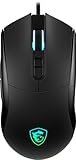
- Top Pick: msi Forge GM320 Gaming Mouse, 12800 DPI, 20M+ Clicks Micro Switch, Optical Sensor, Ergonomic Ambitextrous Hand Design, RGB Light
- Best Value: Redragon M612 Wired RGB Optical Gaming Mouse 8000 DPI Remapping Keys
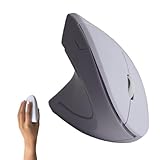
- Premium Choice: Urby Left Handed Mouse, Vertical Left Handed Ergonomic Wireless Mouse.White
Shopping for the best left handed gaming mouse for Mac users is harder than it should be. Most gaming mice are shaped for right-handed use, while genuinely ambidextrous models can feel less supportive during long sessions. Mac users also have to think beyond shape: wired connection, button mapping, software support, and plug-and-play behavior can matter as much as sensor speed.
This ranking focuses on eight left-handed, vertical, ambidextrous, and left-specific options at a range of prices. We prioritized useful hand shapes, gaming controls, Mac-friendly connection types, and practical value. Because software support can vary by macOS version, confirm that any configuration app works with your Mac before buying, especially if you want to customize buttons or lighting.
As an Amazon Associate we earn from qualifying purchases at no extra cost to you. Product prices and availability are accurate as of the date shown and are subject to change.




Quick Picks
| Product | Best for | Price |
|---|---|---|
| MSI Forge GM320 Gaming Mouse | Ambidextrous gaming on a budget | $29.99 |
| Redragon M612 Wired RGB Optical Gaming Mouse | Affordable remappable controls | $16.99 |
| Urby Left Handed Vertical Wireless Mouse, White | Wireless vertical comfort | $23.99 |
| Urby Left Handed Vertical Wireless Mouse, Black | Wireless vertical comfort in a darker finish | $23.99 |
| Ergonomic Left-Handed Vertical USB Mouse | Adjustable resolution for work and casual play | $17.99 |
| Left Handed Vertical Ergonomic Wired Mouse | Simple plug-and-play Mac setup | $17.98 |
| ELECOM EX-G Left Handed Thumb Control Trackball | Wireless pointer control with minimal desk movement | $39.99 |
| Razer Naga Left-Handed | MMO players who need many thumb buttons | $149 |
How We Picked
We looked at each mouse’s handedness, shape, connection type, gaming features, and stated Mac relevance. A good left-handed mouse should keep the wrist in a comfortable position and avoid forcing the thumb onto an awkward side. Vertical models can be especially appealing for users who experience wrist fatigue, while ambidextrous models are often better for fast gaming movements.
We also separated genuine performance features from convenience features. DPI ratings indicate adjustment range, but they do not automatically make a mouse more accurate. Extra buttons are valuable only when they are comfortable to reach and usable with your Mac. Finally, we considered price and who should skip each product rather than treating the most expensive option as automatically best.
The 8 Best Picks
1. MSI Forge GM320 Gaming Mouse
The MSI Forge GM320 is the strongest all-around choice for left-handed Mac users who want a conventional gaming shape without spending much. Its ergonomic ambidextrous hand design makes it more flexible than a standard right-handed mouse, and the optical sensor is suited to everyday pointer work and gaming. The 12,800 DPI rating gives you plenty of sensitivity range, while the 20M+ click micro switch specification adds reassurance for frequent use. RGB lighting supplies a familiar gaming look. The main limitation is that ambidextrous designs may not provide the same thumb or palm support as a truly left-specific shape.
- Pro: High 12,800 DPI rating and optical sensor.
- Pro: Ambidextrous design with RGB lighting at $29.99.
- Con: Less hand-specific support than a dedicated left-handed or vertical mouse.
Skip it when: You specifically want a vertical posture or wireless connection.
2. Redragon M612 Wired RGB Optical Gaming Mouse
The Redragon M612 is the value pick for shoppers who want gaming styling and extra control potential at a very low price. It combines an optical gaming sensor with an 8,000 DPI rating, RGB lighting, and remapping keys. Those features make it more flexible than a basic office mouse, particularly for games or creative apps where shortcut access matters. Its wired format also avoids charging interruptions. On a Mac, however, the practical value of remapping depends on whether the required software supports your macOS setup; basic pointer use should be considered separately from advanced customization. The shape is not described as specifically left-handed, so fit should be your first consideration.
- Pro: 8,000 DPI and remapping keys for $16.99.
- Pro: Wired optical design with RGB lighting.
- Con: Not clearly identified as a left-specific shape.
Skip it when: You need guaranteed left-hand ergonomics rather than an affordable gaming feature set.
3. Urby Left Handed Vertical Wireless Mouse, White
The white Urby is aimed at left-handed users who prefer a vertical grip and the freedom of wireless operation. Its left-handed vertical ergonomic design places it in a different category from traditional gaming mice: it is better suited to office work, browsing, and casual play than to competitive sessions requiring rapid, low-friction movements. Wireless operation keeps the desk clear and makes it easy to move between work areas. The white finish has a clean, bright appearance, although it may show marks more readily than a darker shell. At $23.99, it is an accessible way to try a left-specific vertical design without moving into premium pricing.
- Pro: Purpose-built left-handed vertical ergonomic shape.
- Pro: Wireless convenience at $23.99.
- Con: Vertical styling may feel slower for fast-paced gaming.
Skip it when: You need a gaming sensor, RGB lighting, or extensive programmable controls.
4. Urby Left Handed Vertical Wireless Mouse, Black
The black Urby offers the same basic appeal as the white version: a left-handed vertical ergonomic profile combined with wireless convenience. It is a sensible pick for Mac users who spend long periods browsing, writing, or working and want to reduce the twisting associated with a conventional mouse. The darker finish is more understated and may blend more easily with a typical desk setup. At $23.99, it remains a budget-friendly ergonomic experiment. As with the white model, its vertical shape favors comfort and posture over twitch gaming performance, and buyers should not expect the button customization or sensor specifications associated with dedicated gaming hardware.
- Pro: Left-specific vertical design for everyday comfort.
- Pro: Wireless operation and a discreet black finish.
- Con: Limited fit for competitive gaming or complex shortcuts.
Skip it when: You want detailed performance controls or a low-profile gaming shape.
5. Ergonomic Mouse Left Hand, Vertical USB Wired Mouse
This left-handed vertical mouse is one of the most practical budget options for Mac users who do not need wireless operation. It is explicitly designed for left-hand use and includes three adjustable resolution settings: 800, 1200, and 1600. That range is modest compared with gaming-focused models, but it is useful for switching between precise office work and faster pointer movement. The USB wired connection keeps setup straightforward and avoids battery concerns. Its office-and-gaming positioning makes it versatile for casual play, though the vertical grip may take time to feel natural. At $17.99, it is a strong choice for testing whether this style suits your wrist.
- Pro: Three resolution settings: 800, 1200, and 1600.
- Pro: Clearly left-handed and USB wired at $17.99.
- Con: Limited resolution range for serious gaming.
Skip it when: You prefer wireless freedom or a traditional low-profile gaming mouse.
6. Left Handed Vertical Ergonomic Mouse, Wired for PC Laptop Mac
This model is a straightforward choice for buyers who want a left-handed vertical mouse with minimal setup. Its plug-and-play positioning and explicit Mac compatibility make it especially appealing for users who would rather connect the mouse and start working than install configuration software. The wired design is also dependable for a fixed desk, with no wireless pairing or charging routine to manage. Its main strength is simplicity rather than gaming depth. The vertical ergonomic shape should appeal to left-handed office users, but it may not be the quickest option for games that demand rapid flicks or frequent button combinations.
- Pro: Plug-and-play design specified for PC, laptop, and Mac.
- Pro: Left-handed vertical ergonomic shape for $17.98.
- Con: Few stated gaming features or customization options.
Skip it when: You want wireless operation, RGB, or high-resolution gaming controls.
7. ELECOM EX-G Left Handed Thumb Control Trackball Mouse
The ELECOM EX-G takes a different approach with a left-handed thumb-control trackball. Instead of moving the entire mouse across the desk, you control the pointer from the trackball, which can be useful on a compact surface or for users who find repeated arm movement tiring. Its wireless connection adds flexibility, and the dedicated left-handed format avoids the compromises of a reversible shell. Trackballs do require an adjustment period, especially if you are accustomed to a conventional optical mouse. At $39.99, this is best viewed as a specialized productivity and comfort tool rather than a conventional gaming mouse. It can be particularly appealing for desk-heavy Mac workflows.
- Pro: Left-handed thumb-control trackball minimizes desk movement.
- Pro: Wireless design for a cleaner setup.
- Con: Trackball control has a learning curve for new users.
Skip it when: You need the familiar glide and aiming feel of a standard gaming mouse.
8. Razer Naga Left-Handed
The Razer Naga Left-Handed is the specialist option for MMO players who can take advantage of a large number of thumb inputs. Its ergonomic MMO design includes 12 programmable thumb buttons and an adjustable DPI rating up to 8,200, creating a control layout built around skills, items, macros, and shortcuts. That makes it dramatically more capable for button-heavy games than the simpler mice in this roundup. The $149 price is also dramatically higher, so it only makes sense when those controls will genuinely improve your play or workflow. Mac users should verify software support before purchase, since the full value depends on configuring the buttons.
- Pro: 12 programmable thumb buttons for MMO control.
- Pro: Ergonomic left-handed gaming design with up to 8,200 DPI.
- Con: The $149 price is excessive for basic pointer use.
Skip it when: You mostly browse, work, or play games with simple controls.
Buying Guide
Choose shape before speed
A left-handed or vertical shape is usually more important than a large DPI number. Vertical mice can encourage a more neutral wrist position, while ambidextrous gaming mice typically feel more familiar for aiming and quick movements. If possible, compare the grip to your hand size and preferred finger placement before buying.
Check Mac software needs
Basic USB pointing generally requires less setup than programmable controls or lighting adjustments. If you need remapping, macros, or DPI profiles, confirm that the manufacturer’s configuration software supports your Mac and current macOS version. A mouse can still function as a pointer even when advanced controls are unavailable.
Match the connection to your desk
Wired mice are simple and consistent, but the cable can add clutter. Wireless models offer a cleaner setup, while trackballs reduce the amount of desk space needed for pointer movement. Consider whether you want zero charging concerns, easy portability, or a fixed workstation before choosing.
Our Verdict
The MSI Forge GM320 is the best overall balance for left-handed Mac users who want a gaming-ready, ambidextrous mouse at a reasonable price. Choose the $17.99 vertical USB model for affordable ergonomic comfort, or the $17.98 plug-and-play option for the simplest Mac setup. The ELECOM is the most distinctive productivity pick, while the Razer Naga is worth its premium only for MMO players who will use all 12 thumb buttons.
FAQ
What is the best left-handed gaming mouse for Mac users?
The MSI Forge GM320 is the best overall pick because it combines an ambidextrous ergonomic design, optical sensor, 12,800 DPI, and RGB lighting for $29.99. For MMO players, the Razer Naga offers more dedicated controls.
Are vertical mice good for gaming?
Vertical mice can be comfortable for everyday work and casual gaming, but their grip may feel less natural for rapid aiming. They are best for users who prioritize wrist posture over competitive gaming speed.
Will these mice work with a Mac?
The wired vertical model specifically described for PC, laptop, and Mac is the clearest plug-and-play choice. Other USB and wireless mice may work for basic pointing, but advanced button, DPI, or lighting controls can depend on macOS software support.
Is a high DPI rating always better?
No. DPI describes pointer sensitivity, not overall quality. A comfortable shape, reliable sensor, suitable surface, and usable button layout matter more than selecting the highest available number.
Ready to decide? Our #1 pick for 2026 is the MSI Forge GM320 Gaming Mouse.
Live price & availability on Amazon.
Related Reviews & Guides



Left Handed Computer Mouse
3 Best Left Handed Golf Drivers: Distance & Accuracy Guide