Last Updated: October 8, 2026
The right return address label saves you from handwriting your address on every envelope and adds a polished, professional touch to your mail. Whether you prefer classic printed sheets, customizable rolls, or DIY labels you print at home, 2026 offers plenty of attractive, durable options. This guide compares the best return address label products and helps you pick the format that fits your mailing habits.
As an Amazon Associate I earn from qualifying purchases.



How We Chose the Best Return Address Labels
We evaluated adhesive strength, print clarity, design variety, ink smudge resistance, and overall value. A great return address label sticks firmly to envelopes, resists moisture, and looks clean whether it is preprinted or run through your own printer. Here is a quick comparison of the options we recommend.
| Product | Best For | Standout Feature | Rating |
|---|---|---|---|
| Avery 5160 Address Labels | Home printing in bulk | 30-per-sheet layout | 4.8/5 |
| Avery 8160 Inkjet Labels | Smudge-free inkjet output | Quick-dry coating | 4.7/5 |
| Return Address Roll Labels | Grab-and-peel convenience | Continuous roll dispensing | 4.5/5 |
| Personalized Foil Labels | Gifts and holiday cards | Elegant foil accents | 4.6/5 |
| Clear Address Labels | Seamless envelope look | Transparent background | 4.4/5 |
Choosing the Right Return Address Label Format
Return address labels come in three main formats. Printable sheets, like the Avery ecosystem, let you design and print in bulk on your home printer, offering the most flexibility and lowest per-label cost. Preprinted or personalized labels arrive ready to peel and stick, which is convenient but less customizable. Roll labels feed continuously and are ideal for high-volume senders. If you run a home business, our guide to professional mailing and branding tips pairs well with any of these formats.
Consider your printer type when choosing printable sheets, since inkjet and laser labels have different coatings optimized for each. Inkjet-specific labels resist smudging from liquid ink, while laser labels tolerate the heat of a laser printer’s fuser. Using the wrong type can cause smearing or curling. Our overview of inkjet versus laser label sheets explains the difference so you avoid wasted sheets.
Avery 5160 Address Labels — Best for Bulk Home Printing
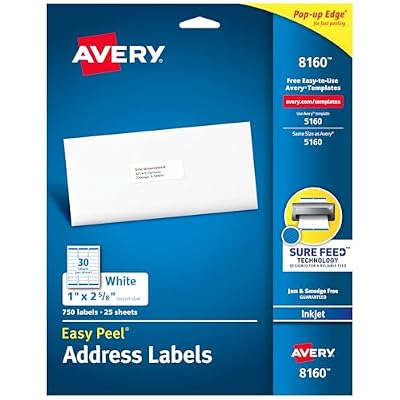
The Avery 5160 is the industry-standard address label sheet, with 30 labels per page and free templates in nearly every word processor. It is perfect for holiday cards and mass mailings. Pros: universal template support, economical in bulk, reliable adhesive. Cons: it is designed for laser printers, so inkjet users should choose the 8160 variant to avoid smudging on the coated surface.
Avery 8160 Inkjet Labels — Best for Inkjet Printers
Functionally identical in layout to the 5160 but coated for inkjet ink, the 8160 dries quickly and resists smearing. It is the go-to for anyone printing address labels at home with an inkjet. Pros: quick-dry surface, sharp text, same 30-up layout. Cons: it costs slightly more than plain paper labels, and heavy ink coverage still benefits from a few seconds of drying before handling.
Return Address Roll Labels — Best for Convenience
Preprinted roll labels dispense one at a time, so you can peel and stick without loading a printer or aligning a sheet. They are ideal for frequent senders who value speed. Pros: fast, no printing required, tidy dispensing. Cons: the design is fixed once printed, so any address change means ordering a new roll, and customization is limited to what you specify at order time.
Personalized Foil Labels — Best for Special Occasions
Foil-accented return address labels add a touch of elegance to wedding invitations, holiday cards, and gifts. The metallic shimmer elevates otherwise plain envelopes. Pros: upscale appearance, memorable, great for events. Cons: they cost more than everyday labels and the foil finish is best reserved for special mailings rather than routine bills and correspondence where the premium look goes unnoticed.
Clear Address Labels — Best for a Seamless Look
Transparent labels let your envelope color show through so the address appears printed directly on the paper. They create a clean, modern aesthetic. Pros: nearly invisible background, elegant, professional. Cons: contrast can suffer on dark or patterned envelopes, and ink legibility depends on solid, light-colored backgrounds, so they work best over white or pastel stationery.
Kraft Brown Address Labels — Best Rustic Style
Kraft paper labels bring a warm, natural, handmade vibe that suits rustic weddings, small shops, and eco-conscious senders. They pair beautifully with twine and brown packaging. Pros: charming aesthetic, recyclable feel, distinctive. Cons: the brown background lowers contrast for standard black ink, so bold or dark fonts read best, and the matte surface may show smudges with wet inkjet ink.
Printing and Applying Return Address Labels
For printable sheets, always run a single test page before committing a full stack to check alignment and ink coverage. Store label sheets flat in a cool, dry place to prevent curling, which causes printer jams. Press each label firmly for a few seconds so the adhesive bonds fully to the envelope. If you want to design your own, our step-by-step guide to printing address labels at home covers template setup, and our envelope and mailing organization ideas help you build an efficient mailing station. For creative flourishes, browse our custom label design inspiration.
Frequently Asked Questions
What size is a standard return address label?
A standard return address label is typically about two-thirds of an inch tall and one and three-quarter inches wide, matching the popular Avery 5160 and 8160 layouts of 30 labels per sheet. This compact size fits neatly in the upper-left corner of standard envelopes while leaving room for your full name and address.
Can I print return address labels on any printer?
You can, but you should match the label type to your printer for best results. Inkjet-coated labels resist smudging from liquid ink, while laser labels tolerate the heat of a laser printer’s fuser. Using laser-only labels in an inkjet, or vice versa, can cause smearing or curling, so check the packaging before printing.
How do I keep return address labels from smudging?
Choose labels coated for your specific printer type, and allow inkjet prints a few seconds to dry before handling. Quick-dry inkjet labels like the Avery 8160 minimize smearing. Avoid touching freshly printed text, and store printed sheets flat. For maximum durability, some users add a light spray sealant, though quality coated labels usually suffice.
Are preprinted or printable return address labels better?
It depends on your needs. Preprinted roll or personalized labels offer grab-and-peel convenience with no printing, ideal for frequent senders with a stable address. Printable sheets cost less per label and let you update your design anytime, making them better for occasional bulk mailings or anyone who changes addresses or wants seasonal variety.
Related Reviews & Guides


6 Best Used Left-Handed Ladies Golf Clubs 2026
6 Best Left-Handed Notebooks 2026