Last Updated: September 18, 2026
Quick answer: Our top pick in 2026 is the Basic symmetrical wired mouse — our #1 rated choice. See the full ranked comparison, alternatives and buying advice below.
The Short Answer
Yes, a left-handed gaming mouse is worth it if you use your left hand for long gaming sessions and your current mouse causes discomfort, awkward wrist angles, or reduced control. If you are simply curious but already comfortable with a standard mouse, the answer is probably no. The one condition is that you must be willing to accept a smaller selection of models, higher prices, and possible compromises in buttons or software.
The practical difference is not that a left-handed mouse makes you instantly better at games. It is that the shape, thumb rest, side buttons, and sensor controls are designed around your dominant hand. For left-handed players who spend several hours at a desk, that can be a meaningful comfort upgrade. For casual users, a symmetrical or ambidextrous mouse may deliver most of the benefit for less money.
As an Amazon Associate we earn from qualifying purchases at no extra cost to you. Product prices and availability are accurate as of the date shown and are subject to change.

What You Actually Get
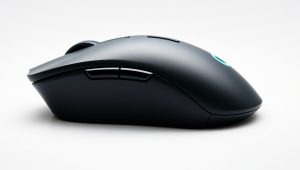
A left-handed gaming mouse is usually one of three things: a true left-handed design, a reversible ambidextrous design, or a basic symmetrical mouse that works equally well in either hand. Those categories matter. A true left-handed mouse generally places its thumb support and side buttons on the right side of the body. A reversible model may let you swap button modules or remove unused controls. A symmetrical mouse keeps the same shape on both sides, though its side buttons may not be equally convenient for both hands.
The main benefit is alignment. When the mouse is shaped for your left hand, your thumb, ring finger, and pinky can rest on intended surfaces instead of gripping the edges. That may reduce the need to twist your wrist or pinch the mouse during precise movements. It can also make low-sensitivity aiming more comfortable because you are moving the mouse with your forearm rather than making small, tense wrist movements.
Expect gaming mice to fall roughly between 4.5 and 6.5 ounces, with compact models commonly measuring about 4.5 to 4.9 inches long and larger palm-grip designs reaching about 5 inches. Weight and dimensions are personal preferences, not quality scores. A lightweight mouse can feel fast for competitive shooters, while a heavier model may feel more planted in strategy games, role-playing games, and office work.
Features vary widely. You may get adjustable sensitivity, programmable buttons, onboard profiles, RGB lighting, a braided cable, and either wired or wireless connectivity. The Razer Naga left-handed model, for example, is aimed at MMO players and includes 12 programmable thumb buttons with sensitivity settings up to 8,200 DPI. At about $149, it is a specialized purchase rather than a general-purpose bargain.
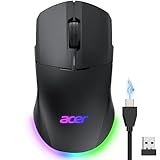
By contrast, a low-cost option such as Acer’s dual-mode 2.4GHz wireless and wired gaming mouse costs about $21.99. It may be a reasonable way to test whether you prefer a gaming mouse in your left hand, but a low price usually means fewer programmable controls, simpler materials, and less sophisticated software. Neither price nor DPI alone tells you whether a mouse will fit your hand.
Pros
- Better hand positioning: A left-handed shape can keep your wrist and forearm in a more natural position, especially during long sessions.
- Improved comfort: A proper thumb rest and finger ledges may reduce pressure from gripping a small, generic mouse.
- More consistent control: A comfortable grip can make repeated aiming, dragging, and clicking feel easier to reproduce.
- Access to useful side buttons: Left-handed models put thumb buttons where your left thumb can reach them instead of placing them on the far side.
- Better desk ergonomics: You do not have to angle your keyboard, rotate your wrist, or reach across the mouse simply because most mice are made for right-handed users.
- Potentially better productivity: Programmable buttons can handle browser navigation, push-to-talk, copy and paste, or repeated commands outside games.
- More choice than there used to be: Dedicated left-handed, ambidextrous, wired, and wireless options cover several budgets, even though the market remains smaller.
Cons
- Higher prices: Specialty models can cost around $80 to $150 or more, while basic wired or dual-mode mice may cost roughly $20 to $40.
- Limited selection: You will find fewer shapes, sensor options, colors, and sizes than right-handed shoppers.
- Fewer MMO-style choices: If you want a grid of 12 or more thumb buttons, the list of true left-handed models becomes especially short.
- Software limitations: Some manufacturer apps are less polished than the hardware, and custom profiles may require the software to remain installed.
- Adjustment time: If you have used a right-handed or generic mouse for years with your left hand, a new shape may feel strange for several days.
- Potentially unnecessary features: Very high DPI ratings, RGB lighting, and dozens of macros add cost without improving comfort for every buyer.
- Replacement difficulty: If a niche model is discontinued, finding the same shape later may be harder than replacing a common mainstream mouse.
Who Should Buy It
Buy a left-handed gaming mouse if you regularly use your left hand and notice pain, fatigue, numbness, or tension with your current setup. A properly sized mouse is especially worthwhile if you play for two or more hours at a time, use a low-sensitivity aim style, or perform detailed work such as photo editing, 3D design, or spreadsheet navigation.
It is also a good choice if side buttons matter to you. MMO players, productivity-focused users, and anyone who relies on shortcuts can benefit from buttons positioned under the thumb rather than on the wrong side of the mouse. The Razer Naga left-handed model makes the most sense for that buyer: its 12 thumb buttons are a strong reason to consider it, while its roughly $149 price is difficult to justify if you only need left and right click.
Choose wired or wireless based on your routine, not on assumptions about performance. A wired mouse avoids charging and generally costs less. A wireless model keeps your desk cleaner and can be used across more than one computer. Dual-mode models provide both options and can be a practical middle ground.
Who Should Skip It
Skip a dedicated left-handed model if you already use a symmetrical mouse comfortably, rarely game, or spend less than an hour at a time at your computer. A basic symmetrical model may provide a similar hand position without the specialty price.
You should also skip an expensive MMO mouse if you will not use its extra buttons. Paying $100 or more for a large button grid makes little sense when a three-button or five-button design fits your games and work. Likewise, do not assume that an ergonomic shape is automatically comfortable. A tall palm-grip mouse can feel awkward if you use a fingertip grip or have smaller hands.
Cheaper Alternatives
| Option | Cost | Trade-off |
|---|---|---|
| Basic symmetrical wired mouse | $10–$25 | Lowest cost, but usually fewer buttons and a less supportive shape. |
| Acer dual-mode wireless/wired gaming mouse | About $21.99 | Affordable flexibility, but expect a simpler design and fewer premium controls than specialty models. |
| Entry-level ambidextrous gaming mouse | $25–$50 | Works in either hand, though side buttons may be limited or uncomfortable on one side. |
| Used or refurbished left-handed gaming mouse | $30–$90 | Better ergonomics for less money, but battery condition, wear, and return policies vary. |
| Razer Naga left-handed MMO mouse | About $149 | Excellent button capacity for MMO commands, but expensive and more specialized than most users need. |
The best budget strategy is to start with a symmetrical or ambidextrous mouse if you are unsure. Look for a body length near 4.5 to 5 inches, a weight you can lift comfortably, and a shape that does not force your fingers against the sides. If that solves your comfort problem, there is no need to upgrade. If you still want more support or buttons, move to a dedicated left-handed model.
FAQ
Are left-handed gaming mice better for left-handed people?
They can be, but “better” depends on grip, hand size, and game type. A true left-handed mouse is usually more comfortable than a right-handed model, while a good symmetrical mouse may feel just as natural for some users. Fit matters more than branding or maximum DPI.
Is a left-handed mouse worth it for FPS games?
It can be worth it for comfort and consistency, particularly if you play at low sensitivity or use a large mousepad. It will not automatically improve aim. Practice, sensitivity settings, display position, and a relaxed grip still have a greater effect on performance.
Should I buy wired or wireless?
Buy wired if you want the lowest cost and do not mind a cable. Choose wireless if desk clutter, portability, or freedom of movement matters more. Dual-mode mice are useful when you want wireless convenience but still want a cable option for charging or backup.
What should I check before buying one in 2026?
Check the exact handedness, dimensions, weight, button placement, return policy, and operating-system software. Confirm that the side buttons are on the right side for your left thumb and that the mouse is large or small enough for your grip. A comfortable shape with five useful buttons is often a better purchase than an uncomfortable model with 12 programmable ones.
Ready to decide? Our #1 pick for 2026 is the Basic symmetrical wired mouse.
Live price & availability on Amazon.
Related Reviews & Guides


5 Best Left Handed Corkscrews & Wine Opener

Best Sandisk Sd Card in 2026: What to Know Before You Buy