

Last Updated: September 18, 2026
- Top Pick: Razer RZ01-01050100-R3M1 Naga Left-Handed – Ergonomic MMO Gaming Mouse with 12 Programmable Thumb Buttons – 8,200 Adjustible DPI
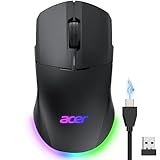
- Best Value: Acer Dual-Mode 2.4GHz Wireless & Wired Computer Gaming Mouse for PC, Laptop
- Premium Choice: Logitech M185 Compact Ambidextrous 2.4 GHz Wireless Mouse – Swift Grey
When comparing a left handed gaming mouse vs ambidextrous mouse, the real decision is not simply whether you use your left or right hand. It is whether your home setup benefits more from a mouse shaped around one hand or from a flexible design that can be shared, repositioned, and replaced easily. Desk size, household habits, game genres, wrist comfort, cable management, and budget all matter.
A dedicated left-handed mouse can make long gaming sessions feel more natural, especially when its thumb controls and contours are placed for the left hand. An ambidextrous mouse, meanwhile, usually offers a symmetrical shape that works for either hand and may be the more practical choice for a family computer, compact desk, or multipurpose workspace. The best option for your home in 2026 depends on how consistently one person uses the mouse and how much specialized performance is actually useful.
As an Amazon Associate we earn from qualifying purchases at no extra cost to you. Product prices and availability are accurate as of the date shown and are subject to change.



Quick Verdict
Choose a left-handed gaming mouse if you use your left hand every day, play for extended sessions, and want hand-specific ergonomics, extra buttons, or gaming-focused controls. It is particularly appealing for MMO players and left-handed users who are tired of adapting to right-hand-only shapes.
Choose an ambidextrous mouse if several people share the computer, you switch hands, need a compact setup, or want a lower-cost replacement. Symmetrical models are generally easier to find, easier to resell, and more suitable for general work, browsing, schoolwork, and casual gaming.
There is one important limitation: “ambidextrous” does not always mean every button works equally well with both hands. Some symmetrical mice place side buttons on only one side, while true two-sided models may have fewer programmable controls to avoid accidental clicks.
Side by Side
| Factor | Left-Handed Gaming Mouse | Ambidextrous Mouse |
|---|---|---|
| Comfort | Contours and thumb rests can support the left hand, especially during long sessions. | Neutral shape suits either hand, but may feel less supportive over many hours. |
| Durability | Gaming construction is often robust, but more buttons and electronics add potential failure points. | Simple office models can be durable because they have fewer controls and moving parts. |
| Price range | About $50 to $160 for specialized wired or wireless models. | About $14 to $100, with basic wireless models at the low end. |
| Maintenance | More crevices and buttons can collect dust; software may require occasional updates. | Simpler shells are usually easier to wipe and troubleshoot. |
| Space needed | Often needs a larger mouse area for fast gaming movements and a dedicated position. | Works well on small desks and can be moved between users. |
| Look | Usually has a more aggressive gaming appearance, lighting, and additional controls. | Typically looks understated enough for an office, bedroom, or shared living space. |
| Resale | Smaller buyer pool because the shape is designed for left-handed users. | Broader appeal makes replacement and resale easier. |
| Best for | Dedicated left-handed gaming, MMO shortcuts, and long personal sessions. | Shared computers, general productivity, travel, and mixed-handed households. |
Where Left Handed Gaming Mouse Wins
The strongest advantage is reduced compromise. A left-handed gaming mouse can put the palm support, thumb shelf, and side controls where your left hand naturally expects them. That may reduce the need to rotate your wrist or reach across the shell for buttons. For users who spend several hours gaming, small ergonomic improvements can be more valuable than decorative features.
Specialized models also tend to offer gaming-oriented specifications. Depending on the product, that can include adjustable sensitivity, programmable buttons, onboard profiles, textured grips, and a polling rate suited to responsive play. MMO players benefit especially from extra commands near the thumb. A product such as the Razer RZ01-01050100-R3M1 Naga Left-Handed is listed with 12 programmable thumb buttons and adjustable sensitivity up to 8,200 DPI, at a listed price of $145.99. Its relevance is the control layout: a left-handed player who regularly uses many keybinds may value those shortcuts more than a basic mouse’s lower price.
A dedicated model can also make your desk feel more personal. If one person owns the computer and rarely shares it, there is little reason to prioritize a neutral design. A wired option can avoid battery changes, while a wireless gaming model can reduce cable clutter. Before buying, check the mouse’s length, width, and height against your hand and desk. Many full-size gaming mice occupy roughly 4.5 to 5.2 inches in length and 2.5 to 3.1 inches in width, though individual designs vary.
The drawbacks are availability and specialization. Left-handed shapes are less common, replacement choices can be limited, and a family member may not find the mouse comfortable. More buttons also increase the learning curve and create more surfaces to clean. A left-handed gaming mouse is worth the premium when you will use its shape and controls—not merely because it is marketed as a gaming accessory.
Where Ambidextrous Mouse Wins
An ambidextrous mouse is the practical default for a shared home. One person can use it with the left hand, another with the right, and the mouse can move from a desk to a laptop without requiring a second specialized device. Its symmetrical shape is also useful if you alternate hands to change posture during the day.
Price is another clear advantage. The Logitech M185 Compact Ambidextrous 2.4 GHz Wireless Mouse is listed at $13.99, while the full-size Logitech M510 Ambidextrous 2.4 GHz Wireless Mouse is listed at $27.99. Those prices illustrate the broad range: a compact basic mouse may cost about $14 to $25, while a more substantial wireless or gaming-oriented ambidextrous model may run $30 to $100 or more.
For a modest home office, an ambidextrous mouse is less visually demanding. Many are between roughly 3.5 and 5 inches long and weigh about 2 to 4 ounces, making them easy to store in a drawer or carry with a laptop. A lower-profile design can also leave more room for a keyboard, notebook, charging dock, or monitor stand on a narrow desk.
Ambidextrous models are not automatically perfect for left-handed gaming. A symmetrical shell may lack a thumb rest, and side buttons can be placed on one side only. Basic models may also offer fewer sensitivity settings or no software for remapping controls. The Acer Dual-Mode 2.4GHz Wireless & Wired Computer Gaming Mouse for PC, Laptop is listed at $21.99, showing how an inexpensive model can offer a gaming-oriented alternative without the price of a specialized left-handed design. Confirm its button layout and hand compatibility before purchase.
Cost Over 5 Years
Upfront price is only part of ownership cost. Suppose a left-handed gaming mouse costs $90 to $160 and an ambidextrous mouse costs $14 to $60. If both last the full five years, the annual hardware cost is approximately $18 to $32 for the left-handed model versus $3 to $12 for the ambidextrous model.
That calculation changes if the cheaper mouse is replaced more often. Buying three $20 ambidextrous mice over five years costs $60, while one $120 left-handed gaming mouse costs twice as much initially but may still be the better value if its comfort prevents you from buying accessories or replacing it early. Wireless models can also require batteries. At two $3 to $8 battery sets per year, five-year battery costs may add roughly $30 to $80 unless the mouse uses a rechargeable battery.
Do not assume an expensive gaming mouse will last longer. Warranty length, switch quality, cable construction, battery design, cleaning habits, and frequency of use matter more than price alone. For predictable budgeting, include the mouse, replacement batteries if needed, and a simple desk mat—often about $10 to $30.
Which One for Your Home
Small apartment
Pick an ambidextrous mouse when desk space is limited or the computer doubles as a work, streaming, and school station. A compact wireless model can be stored quickly and moved between rooms. Choose a left-handed gaming mouse only if gaming is the primary activity and you have enough surface area for wide movements.
Family with kids or pets
An ambidextrous mouse usually makes more sense because it can be shared and replaced affordably. A simple shell with fewer buttons may be easier to clean after crumbs, dust, or pet hair reach the desk. Keep the receiver, spare batteries, and mouse itself away from small children; wireless accessories are easy to misplace.
Rental
Renters often benefit from a wireless ambidextrous mouse because it avoids another cable crossing a temporary desk arrangement. If the computer belongs to one left-handed gamer, however, a wired left-handed model can be dependable and does not require charging. Use a removable desk mat to protect a rented surface from friction and spills.
Long-term home
In a permanent office or dedicated gaming room, buy for the person who uses the mouse most. A left-handed gaming mouse is the better investment when hand-specific comfort and programmable controls will be used weekly. If the room serves multiple people, retain the flexibility of an ambidextrous model and spend the savings on a supportive chair, monitor arm, or larger desk mat.
FAQ
Is a left-handed mouse better for left-handed people?
Not automatically. It is better when its shape and controls match your hand and habits. Some left-handed users prefer a symmetrical mouse because it is lighter, smaller, or easier to share. Try to compare dimensions, button placement, and grip style rather than relying on the label alone.
Can an ambidextrous mouse be used for serious gaming?
Yes. A symmetrical mouse can work well for competitive or casual gaming if its sensor, shape, weight, and buttons suit you. The main compromise is often fewer conveniently placed side controls. Players who need many shortcuts may prefer a specialized left-handed gaming design.
Are left-handed gaming mice more expensive?
They often are because production runs are smaller and they include features such as programmable buttons, adjustable sensitivity, and gaming software. Basic ambidextrous models can cost around $14 to $30, while specialized left-handed options commonly range from about $50 to $160.
Should I choose wired or wireless?
Choose wired for uninterrupted power and simple setup. Choose wireless for a cleaner desk and easier movement between devices. For gaming, check battery life, charging method, receiver storage, and whether the mouse can operate while charging. Either connection type can work well when the shape fits your hand.
Ready to decide? Our #1 pick for 2026 is the Comfort.
Live price & availability on Amazon.
Related Reviews & Guides


Quick Picks: Left-Handed Grip Strength Trainers

Quick Picks: Left-Handed Calligraphy Pen Sets


