

Last Updated: September 18, 2026
- Top Pick: Razer RZ01-01050100-R3M1 Naga Left-Handed – Ergonomic MMO Gaming Mouse with 12 Programmable Thumb Buttons – 8,200 Adjustible DPI
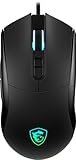
- Best Value: msi Forge GM320 Gaming Mouse, 12800 DPI, 20M+ Clicks Micro Switch, Optical Sensor, Ergonomic Ambitextrous Hand Design, RGB Light
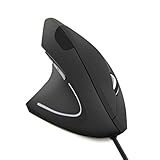
- Premium Choice: FLY WAY Left Handed Mouse,Ergonomic Vertical USB Wired Mouse 800/1200/1600 DPI Optical 6 Buttons Gaming Mice for PC Laptop Computer Desktop Mac (Left Hand)
Choosing a left-handed gaming mouse is not as simple as finding the highest DPI number on the box. Many buyers focus on 20,000 DPI, RGB lighting, or the number of buttons, then discover that the mouse is too wide, uncomfortable, poorly balanced, or awkward to configure with the left hand. Others buy an ambidextrous model that looks suitable but has side buttons only on the right side.
The better approach is to match sensitivity, shape, controls, and connection type to the way you actually play. If you are researching how to choose left handed gaming mouse dpi, start with your preferred in-game sensitivity rather than chasing the biggest specification. Most players will use a small portion of a mouse’s maximum DPI range. A reliable sensor, predictable tracking, comfortable grip, and true left-side controls matter more than a headline number.
As an Amazon Associate we earn from qualifying purchases at no extra cost to you. Product prices and availability are accurate as of the date shown and are subject to change.

Decide These 3 Things First
- Your grip and hand size: Measure from the tip of your middle finger to the bottom crease of your palm. Hands under 7 inches usually suit compact mice, 7 to 8 inches fit medium designs, and hands over 8 inches may need a larger shell. Also decide whether you use palm, claw, or fingertip grip.
- Your normal sensitivity: Start around 800 to 1,600 DPI for most PC gaming, then adjust in the game. Competitive first-person shooter players often prefer 400 to 1,000 DPI with a larger mousepad, while strategy and productivity users may prefer 1,200 to 3,200 DPI. A 8,000 or 12,800 DPI maximum is not automatically better.
- Your button requirements: A simple left-handed mouse may need only five or six buttons. MMO players may benefit from 10 to 12 programmable thumb buttons, but those controls are useful only if your left thumb can reach them without changing your grip.
Size and Shape
Shape is one of the most important buying decisions because it affects aim, wrist position, and fatigue. A mouse that is too small can force your fingers into a cramped claw grip; one that is too large may make precise fingertip movement difficult.
As a practical starting point, look for a mouse approximately 4.5 to 5 inches long, 2.4 to 2.8 inches wide, and 1.4 to 1.7 inches high for an average adult hand. Compact models around 3.9 to 4.4 inches long can work well for smaller hands or fingertip grip. Larger palm-grip models may reach 5 inches or more.
Weight also changes how DPI feels. A lightweight mouse weighing 60 to 80 grams moves quickly and works well with low sensitivity and broad arm movements. A 90- to 110-gram mouse can feel steadier for slower, controlled movements but may cause more fatigue during long sessions. MMO mice with many buttons are often heavier because of their larger shells and internal hardware.
Check the side-button placement carefully. A genuinely left-handed design should place its thumb controls on the right side of the mouse, where a left hand can reach them. An ambidextrous mouse may support either hand but still have buttons on only one side.
Material and Surface Finish
Most gaming mice use injection-molded ABS plastic. That is normal and can be durable, but the finish determines how secure the mouse feels. Smooth plastic is easy to clean but may become slippery with warm hands. Fine texture or rubberized side panels can improve grip, especially for players who lift and reposition the mouse frequently.
Look for a consistent seam between shell panels, firm side walls, and a coating that does not feel sticky. Rubber grips may offer more traction, but they can wear or become glossy over time. A matte plastic shell is usually easier to maintain and less likely to show fingerprints.
For wired models, inspect the cable material as well. A flexible braided cable is generally easier to route than a stiff rubber cable, although cable quality varies. A mouse bungee or a simple cable-management clip can keep a wired cord from catching on the edge of a desk. Wireless models should have a receiver that can be positioned close to the mouse rather than hidden behind a metal computer case.
Construction and Controls
Construction quality is more important than decorative lighting. Press the main buttons and check for even travel, a firm click, and minimal side-to-side movement. The scroll wheel should rotate in clear steps without wobbling. Side buttons should be easy to distinguish by touch but should not activate accidentally when you squeeze the shell.
Switch ratings are useful as a general durability indicator, not a guarantee. A specification such as 20 million clicks describes a switch’s rated life under controlled conditions; it does not predict how the entire mouse will perform after years of use. A well-supported scroll wheel, solid feet, and a reliable cable connection can matter just as much.
For MMO use, a 12-button thumb grid can be valuable, as seen on the Razer Naga left-handed model listed at about $149. However, the additional buttons increase the chance of misclicks and may make the mouse wider. If you mainly play shooters, six to eight total programmable buttons are usually easier to manage.
Comfort and Performance
DPI means dots per inch, or how far the cursor moves for a given physical movement. It is not the same as accuracy. A 12,800 DPI optical sensor may offer a broad adjustment range, but many players will never use the top setting. High DPI can also make small hand movements feel exaggerated, particularly on a small mousepad.
For a balanced setup, try 800 DPI at first, then adjust the game’s sensitivity in small steps. If you frequently run out of desk space, move toward 1,200 to 2,000 DPI. If you have a large mousepad and prefer arm aiming, 400 to 800 DPI may provide more control. Keep your operating-system pointer speed near its default midpoint while testing so there are fewer variables.
Polling rate is another specification to consider. A 1,000Hz polling rate reports roughly every 1 millisecond, while 500Hz reports roughly every 2 milliseconds. Both are suitable for most users. Higher polling rates can increase power use on wireless mice and may offer little practical benefit if your computer or game is already limited elsewhere.
Check whether the software supports DPI steps, left-handed button remapping, onboard memory, and separate profiles. Onboard memory is convenient if you use the mouse with more than one computer. A DPI button placed underneath the mouse can prevent accidental changes during play, though it is less convenient for quick adjustments.
Price Tiers
Budget: $15 to $35. Expect basic optical tracking, a wired connection or simple wireless operation, and two to six extra buttons. The FLY WAY vertical left-handed mouse, listed around $15.99, offers selectable 800, 1,200, and 1,600 DPI settings and may appeal to users prioritizing wrist position over competitive features. The MSI Forge GM320, listed around $29.99, offers an ambidextrous shape, optical sensor, RGB lighting, and a 12,800 DPI maximum. Verify the side-button layout before buying an ambidextrous model.
Midrange: $35 to $90. This tier commonly adds better feet, more consistent switches, configurable software, improved cable flexibility, and a stronger wireless connection. It is often the best value for a daily gaming mouse because you can get useful controls without paying for a large MMO button grid.
Premium: $90 to $160 or more. Premium models may include a purpose-built left-handed shell, wireless and wired modes, onboard profiles, advanced sensors, and extensive button customization. The Razer Naga left-handed example is listed at about $149 and emphasizes 12 programmable thumb buttons and an 8,200 DPI maximum. Buy this tier for its shape and controls, not simply its DPI ceiling.
Warranty and Return Policy
A gaming mouse is a close-contact product, so a practical return window matters. Look for at least 30 days to test the shape and button placement. A one-year limited warranty is common, while longer coverage can add confidence for a premium purchase.
Read what the warranty excludes. Some policies cover manufacturing defects but not cable damage, worn feet, accidental drops, or normal switch wear. Keep the receipt and original packaging until you are certain the mouse fits. If the product is sold by a marketplace third party, confirm who handles returns and whether replacement shipping is covered.
Delivery and Setup
Check the shipping estimate, especially for a left-handed-specific model that may have lower stock than a standard right-handed mouse. A wired mouse is usually ready as soon as it is plugged in, while a wireless model may require charging, pairing, and receiver placement. Budget 10 to 20 minutes for software installation and button mapping.
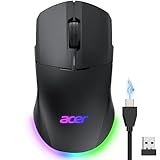
Before committing, measure your desk space and confirm your computer has the required USB port. For a wireless mouse, look for a stated battery estimate, but treat it as a usage-dependent range rather than a promise. A dual-mode model such as the Acer example, listed around $21.99, can be useful if you want both 2.4GHz wireless and wired operation. Confirm whether the charging cable can be used for gameplay if the battery runs low.
Spec Checklist
| Spec | Budget | Mid | Premium |
|---|---|---|---|
| Typical price | $15–$35 | $35–$90 | $90–$160+ |
| DPI range | 800–6,400 | 800–16,000 | 400–30,000+ |
| Useful weight range | 75–115g | 65–105g | 60–100g |
| Polling rate | 125–1,000Hz | 500–2,000Hz | 1,000–8,000Hz |
| Buttons | 5–8 | 6–10 | 8–20+ |
| Connection | Wired or basic wireless | Wired or 2.4GHz wireless | Wired, 2.4GHz, and sometimes Bluetooth |
| Warranty target | At least 90 days | One year | One to two years |
Red Flags
- The listing says “ambidextrous” but shows thumb buttons only on the right side.
- The product gives a maximum DPI but does not identify the sensor, DPI steps, or software support.
- Dimensions, weight, connection type, or warranty information is missing.
- The mouse promises extremely high DPI but has no explanation of lift-off distance, acceleration, or angle snapping.
- Reviews repeatedly mention double-clicking, a loose scroll wheel, wireless dropouts, or side buttons that are difficult to reach.
- The seller uses stock photos that do not clearly show the right side of the mouse, where a left-handed user needs access to controls.
FAQ
What DPI should a left-handed gaming mouse have?
For most players, 800 to 1,600 DPI is a sensible starting range. Competitive FPS players may prefer 400 to 1,000 DPI, while smaller desks and fast cursor movement may justify 1,600 to 3,200 DPI. The maximum number matters less than consistent tracking and easy adjustment.
Are ambidextrous mice good for left-handed gamers?
They can be, but inspect the button layout. A truly symmetrical mouse with controls on both sides offers the most flexibility. An ambidextrous shell with controls on only one side may leave a left-handed user without thumb buttons or may require uncomfortable finger placement.
Is a vertical mouse suitable for gaming?
A vertical mouse can be comfortable for general computing and slower strategy games because it keeps the hand in a more upright position. It may feel less natural for fast competitive games, where rapid swipes, low sensitivity, and a broad range of motion are important.
Should I choose wired or wireless?
Choose wired if you want the lowest cost and no battery maintenance. Choose 2.4GHz wireless if you value a cleaner desk and freedom of movement. A dual-mode mouse gives you a backup cable connection, which is useful during charging or if wireless interference becomes a problem.
Ready to decide? Our #1 pick for 2026 is the Typical price.
Live price & availability on Amazon.
Related Reviews & Guides


Left Handed Bent Scissors vs Straight Scissors: Which Is Right for Your Home (2026)

Best Goofy Stance Skateboards for Left-Handed Riders: Top Picks Reviewed


