Last Updated: September 12, 2026
- Start With the Core Principle
- Step-by-Step Workspace Layout
- The Lighting Detail Most People Miss
- Recommended Layout at a Glance
- Ergonomics: Protecting Your Body
- Choosing the Right Desk
- Completing the Setup With the Right Accessories
- Setting Up Your Mouse Software
- Cable Management and Power for Lefties
- Adapting a Shared or Office Desk
- Top-Rated Picks
- Frequently Asked Questions
- Conclusion
- Related Articles
⚡ Key Takeaways
- Right-handers do this instinctively because the world is built for them.
- Lighting deserves special attention because it is the exception to the "everything on the left" rule.
- A good layout is only half the equation.
- If you are buying a new desk, a few features make left-handed life easier.
Most desks are arranged, almost by default, for right-handed people. The mouse sits on the right, the drawers are on the right, the lamp shines over the right shoulder, and the notepad lands wherever there is space. For a left-hander, this quietly turns every workday into a series of small reaches and awkward angles. A proper left-handed desk setup flips that script, putting your tools where your dominant hand can reach them and giving your writing arm the room it needs. The result is less strain, better focus, and a workspace that finally works with you.
As an Amazon Associate we earn from qualifying purchases at no extra cost to you.



This guide walks through how to arrange every element of a left-handed workspace, from monitor and mouse to lighting and storage.
🛒 Best Price Today on Amazon
Prime members get fast, free shipping on everything above, plus member-only deals. New members get a 30-day free trial — cancel anytime.
Start With the Core Principle
The guiding rule of a left-handed setup is simple: anything you reach for or operate with your dominant hand belongs on the left, and anything that obstructs your writing arm should be moved out of the way. Right-handers do this instinctively because the world is built for them. Lefties have to do it deliberately, but once you do, the comfort difference is immediate.
Step-by-Step Workspace Layout
- Position your mouse on the left. Place the mouse to the left of your keyboard and swap the primary and secondary buttons in your operating system so the index finger does the clicking. This is the single biggest comfort upgrade for most left-handed desk workers.
- Center your monitor, then bias slightly right. Keep the screen at eye level and arm’s length. A very slight rightward bias can balance a left-leaning writing posture, but centered is fine for most people.
- Place your notepad and pen on the left. Your writing surface should sit to the left of center so your arm moves freely without crossing your body.
- Move lighting to the right. This is the one item that goes on the right. A lamp positioned over your right side prevents your left hand from casting a shadow over what you write.
- Keep frequently used items within left-hand reach. Phone, sticky notes, and tools go on the left so you are not constantly reaching across the desk.
- Choose left-accessible storage. If your desk has drawers, the most-used one should be on the left, or use a mobile drawer unit you can position freely.
The Lighting Detail Most People Miss
Lighting deserves special attention because it is the exception to the “everything on the left” rule. When a left-hander writes under a light positioned on the left, their own hand throws a shadow across the page. Positioning the lamp on the right (or directly overhead) keeps your work illuminated. This small change reduces eye strain noticeably during long writing or drawing sessions.
Recommended Layout at a Glance
| Item | Ideal Position for Lefties | Why |
|---|---|---|
| Mouse | Left of keyboard | Dominant hand control |
| Notepad / writing area | Left of center | Free arm movement |
| Desk lamp | Right side or overhead | Prevents hand shadow |
| Phone / tools | Left side | Easy reach |
| Monitor | Center, slight right bias | Balanced posture |
| Drawers / storage | Left-accessible | Reduce reaching |
Ergonomics: Protecting Your Body
A good layout is only half the equation. Ergonomics protect you over the long term, and the principles apply to lefties and righties alike with a few tweaks.
- Elbows at about 90 degrees when typing, with shoulders relaxed.
- Feet flat on the floor or a footrest.
- Monitor top roughly at eye level to keep your neck neutral.
- Wrist support for the mouse hand, on the left where your mouse now lives.
- Take micro-breaks every 30 to 60 minutes to reset posture.
Choosing the Right Desk
If you are buying a new desk, a few features make left-handed life easier. Look for symmetrical or reversible designs where drawers and returns can be placed on either side. L-shaped desks with a configurable return are ideal because you can put the extension wherever your dominant hand needs it. Avoid fixed right-side keyboard trays or built-in right-only drawer columns. Our comparison of the best left-handed desks breaks down which models adapt best to a lefty’s needs.
Completing the Setup With the Right Accessories
Once the layout is sorted, the right tools finish the job. Keep a quick-dry left-handed pen on your notepad to avoid smudging during quick notes, and consider a left-handed notebook with top or right binding so the coils never dig into your wrist. These small additions remove the last bits of daily friction.
Setting Up Your Mouse Software
Moving the mouse physically is only half the job; you also want to swap the buttons so clicking feels natural.
- Windows: Settings, then Bluetooth and devices, then Mouse, and switch the primary button to “Right.”
- macOS: System Settings, then Mouse, and set the secondary click to the left side.
- Consider a symmetrical mouse so the shape suits the left hand rather than curving for the right.
Cable Management and Power for Lefties
A detail that gets overlooked in left-handed setups is where your power and cables live. Because your mouse, charging pad, and frequently used devices now sit on the left, it makes sense to route a power strip or USB hub to that side too. Otherwise you end up trailing cables across the desk, which clutters your writing area and defeats the point of a clean left-side workflow. Mount a small power strip under the left edge of the desk or use a cable tray so cords stay out of your dominant hand’s path.
The same logic applies to your phone. Lefties naturally pick up and operate a phone with the left hand, so place your charger and stand on the left where you can grab it without reaching across your body or knocking over your coffee. These are tiny adjustments, but they remove the repeated micro-frictions that add up over a long workday.
Adapting a Shared or Office Desk
Not everyone controls their own desk, especially in shared offices or hot-desking environments. The good news is that a left-handed setup is largely portable and can be assembled in under a minute. Keep a compact kit with a symmetrical mouse, a quick-dry pen, and perhaps a slim wrist rest, and you can convert any right-handed station into a comfortable left-handed one when you arrive.
When you sit down at a shared desk, the priority moves are simple: shift the mouse to the left of the keyboard, swap the buttons in the operating system if the machine allows it, and move the notepad and any frequently used items to your left. If the desk has a fixed lamp on the left, angle it upward or overhead so it no longer casts a shadow over your hand. At the end of the day you can reverse these in seconds, leaving the station as you found it for the next person.
Top-Rated Picks




| Product | Brand | Rating | Reviews | Price |
|---|---|---|---|---|
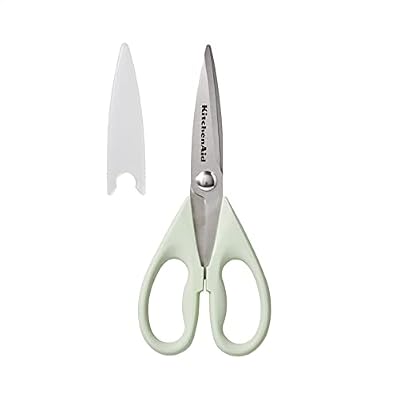
| KitchenAid All Purpose Kitchen Shears with Protective… | — | ★ 4.8 | 70.9k | $7.59 |
| KitchenAid All Purpose Kitchen Shears with Protective… | — | ★ 4.8 | 70.9k | $10.99 |
| KitchenAid All Purpose Kitchen Shears with Protective… | — | ★ 4.8 | 70.9k | $13.99 |
| Bostitch Office Premium 3 Hole Punch, 12 Sheet Capaci… | BostitchOfficeProducts | ★ 4.7 | 64.4k | $12.99 |
| 3M Littmann Classic III Monitoring Stethoscope, 5910C… | Littmann®Stethoscopes | ★ 4.8 | 50k | $112.16 |
Frequently Asked Questions
Should a left-hander put the mouse on the left?
Yes, for most people. Placing the mouse on the left lets your dominant hand control it, which reduces strain. Remember to swap the buttons in your operating system so the index finger handles the primary click.
Where should the desk lamp go for a lefty?
On the right side or directly overhead. This prevents your left hand from casting a shadow over your writing, which is the opposite of where a right-hander would place their lamp.
Do I need a special left-handed desk?
Not necessarily, but a reversible or symmetrical desk helps. The key is being able to position drawers, returns, and accessories on the side your dominant hand uses. L-shaped desks with configurable returns are especially flexible.
How do I stop smudging when taking notes at my desk?
Use a quick-dry pen, angle your notepad clockwise, and keep your hand below the writing line. A left-handed notebook with top or right binding also helps.
Is a left-handed setup worth the effort?
Absolutely. The changes take minutes but pay off every working day in reduced strain, fewer awkward reaches, and better focus. Most lefties wish they had done it sooner.
Conclusion
A left-handed desk setup is one of the easiest, highest-value changes a lefty can make. Put your mouse, notepad, and tools on the left, move the lamp to the right to avoid shadows, mind your ergonomics, and finish with quick-dry pens and a comfortable notebook. The whole process takes an afternoon at most, and the payoff is a workspace that finally feels built for you instead of against you.
Related Reviews & Guides





Is Left-Handedness Genetic? The Science Explained

Left-Handed Sewing Basics: Tools and Techniques